Pages - Menu

Rabu, 30 Januari 2019

Inilah Kalo Hp Boros Baterai, Kenapa Harus Cari Baterai Kapasitas (Mah) Besar???

Kalo HP boros baterai, kenapa harus cari baterai yg kapasitas besar???
Ini yang selalu dipikirkan bagi pemakai hp online ibarat Android/BB (dalam artian hp boros bukan sebab hp rusak/koslet). Padahal selama ukuran volume baterai masih sama atau besar sedikit kapasitas baterai juga nggak bakalan bisa besar 2x dari kapasitas original nya, paling naik 100-300mAh saja. Makara ketahanan baterai juga nggak bakalan bisa 2x dari original nya, kecuali kalo pake baterai extended yang tebal dan harus ganti tutup baterai nya.

Kalo mau cari kapasitas mAh yg besar bisa 2x dari original dengan ukuran volume baterai masih sama dg ori nya, simpulan nya kejebak dengan label2 baterai saja, tapi setalah digunakan hasil nya juga nggak beda jauh dari original nya.
(Baca : Baterai Double power, High Capacity...apa benar???)

Misal nya :
original nya cuma 1200mAh, dicari baterai yang 2000-2400mAh dg ukuran volume sama. Setelah dapat, berharap bisa 2x ketahanan nya dari originalnya, teranyata sama saja, ujung2 nya kekecewaan.

Kenapa bukan HP yang di-irit-kan pemakaian nya??
Sebenarnya itu solusi yang bijaksana dari pada mencari-cari baterai kapasitas besar.
Ini aku co-pas dari kaskus

1. Matikan Live Wallpaper.
Live wallpaper memang terlihat indah tp akan sangat menguras batrei

2. Pilih wallpaper warna gelap/hitam
warna hitam akan memerlukan arus energi yg lebih kecil dari pada
warna-warna terang.

3. Pilih thema louncher warna gelap/hitam.

4. Pilih tingkat pencahayaan display yang paling rendah.

5. Gunakan sedikit mingkin Homescreen
Semakin banyak homescreen akan membebani prosesor dan ram.

6. Pakailah widget seminim mungkin (pilih yg dianggap paling penting)
semakin banyak widget akan semakin banyak aplikasi yg berjalan
di background,shingga akan banyak menghabiskan ram yg ujung2nya
akan ke daya batrei juga.

7. Non Aktifkan semua Animasi.

8. Gunakan layanan 2G (matikan 3G)
Handphone akan selalu mencari jaringan secara terus menerus, bila kita
sedang tidak berada pada jaringan yang baik handphone akan memakaikan
energinya untuk slalu mencari jaringan. ibarat kita ketahui bahwasannya
jaringan 3G di indonesia masih sangat payah.

9. Masih ada hubungannya dengan point 8
Taruh Handphone di daerah dimana sinyal dpt diterima dengan baik.
bila kekuatan sinyal sangat rendah lebih baik posisikan pada flight mode.

10.Usahakan gunakan Aplikasi2 yang mempunyai background warna hitam.
Contoh: chat >-- trillian
browsing >-- UC browser (night mode)
Facebook >-- Tweetdeck
sms >-- hancentsms (dengan theme hitam)
explorer >-- astro/ root explorer
dll..

11.Lebih selektif dalam menginstall aplikasi yang sekiranya akan berjalan
di background.

12.Non Aktifkan Auto sync pada aplikasi atau jauhkan interval waktu
dalam sync. mungkin yang biasanya pake interval 15 menit di setting ulang
menjadi 1jam atau bahkan lebih usang lagi.

13.Matikan GPS,WIFI dan bluetooth kl tidak diperlukan.

14.Matikan profil getar dan kecilkan bunyi dering. Getar dan besarnya volume
dering terang memerlukan energi yang cukup besar.
Tapi bagaimana kl kita membutuhkan getar pada saat-saat tertentu??
pada ketika kerja dilapangan misalnya. tp pada ketika sedang dirumah tentu
kita tidak memerlukan getar atau bunyi yang keras.
Solusinya otomatiskan saja dengan menginstal Auto Switch Profile,

15.Matikan Koneksi data internet bila tidak diperlukan.
Dengan cara menginstall APNDroid, Atau Juice Defender (free di market)
tapi aku langsung lebih menyarankan install Green Power Premium
bagi yang benar-benar ingin menghemat batrenya!(coba cari di pasar malam)
aplikasinya ringan tapi lengkap.
dengan aplikasi ini kita sanggup mengatur berapa menit/jam skali koneksi
data terbuka dan berapa usang koneksi terbuka, aplikasi ini mempunyai mode
malam, sehingga pada malam yang telah kita atur waktunya aplikasi ini
akan menon aktifkan semua layanan koneksi data.
(Perhatian! Aplikasi ini menjadikan kita tidak selalu tergubung internet
sehingga layanan Push email!Push messegging, MMS akan berjalan tidak normal)

Sangat Tidak Disarankan!!
1. Selalu Mematikan Aplikasi yang berjalan di background dengan task killer
atau Andvance task Killer atau yang sejenisnya.
Alasan: System pada android yakni system yang cerdas, beliau tau ketika dimana
beliau membutuhkan ram atau tidak, bila beliau membutuhkan ram maka
scara otomatis beliau akan menutup aplikasi yang memang udah tidak
dibutuhkan lagi.
Menutup Aplikasi dengan paksa (task killer) hanya akan membebani
CPU dan ram ketika aplikasi itu kembali dinyalakan. ini malah
akan menciptakan batre cepat habis.
Itulah yang mendasari mengapa tidak ada exit/close pada aplikasi
android kebanyakan.

Masih Diperdebatkan!!
1. CPU Throttling atau menurunkan Clock Speed pada Prosesor. biasanya dengan
menginstall Set CPU (root)
Sampai ketika ini penurunan clock speed prosesor msh diperdebatkan di forum
lembaga android apakah memang efektif ato tidak, ada sebagian yang mengangap
cara ini sanggup menghemat batre ada sebagian malah menyampaikan aplikasi
semacam ini gak mempunyai kegunaan dan malah menciptakan batre smakin cepat habis.

Alasan yang mendukung:
- Dengan menurunkan Clock speed otomatis energi listik yg mengalir ke proci
akan semakin kecil.
- Terlebih lagi disaat kita tidak sedang membutuhkan proci besar, misalnya
pada ketika layar dalam keadaan mati atau pada ketika tengah malam kita sedang
tidur. pada ketika itu tentu kita jelas2 sedang tidak menggunakan tlp jadi buat
apa Clock speed sebesar 1 ghz?

Alasan yang menolak:
- Android yakni sebuah platform cerdas, dan sejak kemunculan enclair
(2.1) android mempunyai kemampuan memanagemen proci, ram, batrei dll yang
lebih baik. pada ketika HP tidak dipergunakan, android secara otomatis akan
menurunkan energinya ke proci.
- Aplikasi Set CPU yang selalu terus menerus memantau arus ke proci dinilai
malah akan memakan banyak batrei ujung-ujungnya bukan malah menghemat tapi
akan semakin menjadi boros.
- Buat apa kita membeli android 1 ghz yang mahal atau dual core namun pada
ujung-ujungnya kita malah munurunkan kemampuannya.

Catatan:
- Tips dan trik diatas mungkin ada beberapa yang akan sedikitnya menggangu
kenyamanan dalam mamakai si andro, jadi alangkah baiknya kita juga mampu
memanagement kebutuhan kita dalam menggunakan si Android ini.

Selasa, 29 Januari 2019

Inilah Mengenal Komponen Elektro : Resistor(2)

Mengenal Komponen Elektronika : Resistor(2)-Menyambung artikel sebelumnya perihal Jenis Resistor kali ini biar klarifikasi perihal komponen elektro resistor lebih mendetail saya mencoba membuatkan gosip perihal kegunaan resistor,Cara membaca instruksi warna resistor,Variable Resistor,Komponen Pengganti dan Satuan Resistor.Jika dibandingkan dengan komponen elektro yang lain saya pikir Resistor yang paling gampang dipahami walaupun anda berguru secara belajar sendiri namun jangan lupa tidak cukup hanya membaca teorinya saja alangkah baiknya eksklusif praktek dengan mengamati secara langsung.Oke…langsung saja berikut ini gosip selengkapnya:

 kali ini biar klarifikasi perihal komponen elektro resistor lebih mendetail saya menco Inilah  Mengenal Komponen Elektronika : Resistor(2)

Kegunaan Resistor
Resistor banyak dipakai dalam rangkaian elektro untuk:
1.Membagi tegangan listrik
2.Pembagi arus pada rangkaian paralel
3.Menurunkan tegangan listrik
4.Pemikul beban (Load resistance)

Cara Membaca Kode Warna Resistor
Kebanyakan Resisitor yang akan sering anda jumpai saat praktek ialah resistor yang memakai instruksi warna untuk menyatakan besarnya kendala listrik  dan biasanya resistor jenis karbon dan Metal film.Anda sanggup mengetahui besaranya kendala listrik dengan membaca instruksi warna tersebut caranya sebagai berikut:
Urutan Kode warna :Hitam,Coklat,Merah,Oranye,Kuning,Hijau,Biru,Ungu,Abu-Abu,Putih Untuk lebih jelasnya silahkan lihat gambar dibawah ini:

Untuk resistor yang mempunyai 4 gelang warna(Resistor Karbon):
Gelang ke 1 Menyatakan =Angka ke 1
Gelang ke 2 Menyatakan =Angka ke 2
Gelang ke 3 Menyatakan  banyaknya /Faktor Perkalian(10⁰-10⁹)
Gelang ke 4 Menyatakan =Toleransi.Coklat 1% Merah 2% Hijau 0.5% Biru 0,25% Ungu 0,1% Abu-abu 0,05% Emas 5% Perak 10% Tak berwarna 20% Yang Umum dipakai Emas,Perak dan Coklat.
Contoh Sebuah Resistor mempunyai warana Abu-abu merah oranye emas nilainya berarti:
Gelang ke 1 =Abu-abu=8(Angka ke 1)
Gelang ke 2=Merah=2(Angka ke 2)
Gelang ke 3=Oranye=10³=1000(Faktor Perkalian)
Gelang ke 4=Emas=5%(Toleransi)
Kaprikornus nilai resistor tersebut=82x1000=82.000 Ohm
Anda tentu akan bertanya-tanya Angka ke 4/Toleransi Maksudnya apa?Jawaban ringkasnya nilai resistor yang masih sanggup ditolerir kalau ternyata nilai resistor tersebut saat diukur dengan ohmmeter tidak sesuai dengan instruksi warnanya.Dari referensi diatas nilai resistor=82.000 Ohm toleransi 5%=5/100x82.000=4100 Ohm Kaprikornus Nilai resistor Maksimum 82.000+4100=86100 Ohm sedangkan Nilai Minimum=82.000-4100=77900 Ohm Kesimpulannya kalau sebuah resistor dengan kodewarna Abu-abu Merah Orange Emas nilainya antara 77900-86100 Ohm artinya resistor tersebut masih baik.Oleh sebab itu cara mengetahui nilai resistor yang paling akurat yaitu memakai multimeter.
Untuk resistor yang mempunyai 5 gelang warna (Resistor Metal Film)
Gelang ke-1 Menyatakan Angka ke 1
Gelang ke 2- Menyatakan Angka ke 2
Gelang Ke 3 Menyatakan =Angka ke 3
Gelang ke 4 Menyatakan jumlah Nol/Faktor Perkalian
Gelang Ke 5 Menyatakan =Toleransi
Contoh sebuah Resistor mempunyai  warna : Merah, Coklat, Merah, Oranye dan Emas maka nilainya berarti=212x1000=212000 Ohm Toleransinya 5%

Variable Resistor.
Besarnya kendala listrik sebuah resistor  bisa diketahui dengan melihat instruksi warna atau nilai yang tertera eksklusif di bodinya dan nilainya tidak akan berubah kecuali kalau mengalami kerusakan  namun ada jenis resistor yang nilai hambatannya sanggup berubah-ubah namanya variable resistor atau disingkat VR.Bahannya ada yang terbuat dari zat arang  adapula yang terbuat dari kawat nikelin.Contoh yang paling gampang terdapat pada pengatur volume/bass/treble speaker aktif,pengatur volume pada Compo dan lain-lain.Dilihat dari cara kerjanya VR dibedakan menjadi 2 yaitu Potensiometer  dan trimpot.Potensiometer cara merubah hambatannya biasanya dengan cara memutar As nya kekiri kekanan atau menggeser dari  atas kebawah sedangkan trimpot cara merubah hambatannya dengan cara mengetrim memakai obeng.

Komponen Pengganti.
Masalah yang terkadang muncul saat merakit suatu rangkaian elektro yaitu tidak tersedianya komponen yang sesuai dengan yang dibutuhkan.Cara mengatasinya anda sanggup mempergunakan komponen pengganti yang nilainya sama.Untuk resistor komponen pengganti sanggup anda dapatkan dengan menggabung 2 resistor atau lebih sanggup dengan kekerabatan seri atau paralel namun yang paling gampang memakai kekerabatan seri sebab anda tinggal menjumlahkan semua resistor misalnya kalau anda ingin mengganti Resistor yang nilainya 100 Ohm dengan  anda tinggal memakai 2 resistor ukuran 50 Ohm.Sedangkan bila memakai kekerabatan paralel agak sedikit ribet sebab perhitungannya memakai pembagian.

Satuan Resistor
1 Kilo ohm atau 1K Ohm = 1000 Ohm
1Mega ohm atau 1M = 1000 kilo ohm
1K2 Ohm= 1200 Ohm
1M9 Ohm=1900K Ohm
1R2 Ohm= 1,2 Ohm
 
Sampai disini dulu gosip perihal Mengenal Komponen Elektronika : Resistor(2) Semoga semakin menambah pengetahuan Anda khususnya komponen elektro Terima Kasih Atas Kunjungannya.

Senin, 28 Januari 2019

Inilah Baterai Double Power, High Capacity...Apa Benar???

Banyak beredar baterai - baterai dengan label "Double Power", "Super High Capacity", dll tapi bentuk dan ukuran volume nya sama, Apa benar?....
Kebanyak orang membandingkan dengan menurut pemakaian saja, baterai ini sanggup lebih berpengaruh setengah hari dari ori nya, atau baterai merek "H" itu sanggup tahan 2hari. Gimana kalau orang yang pakai nya rajin BBM atau alasannya telpon sesama operator murah/gratis jadi sekali telpon sanggup 1jam, kemudian apa baterainya tetap saja sore hari harus di charge lagi.
Pemakaian daya setiap hp berbeda-beda, hp dengan keadaan standby LCD padam, berbeda jauh dengan kondisi LCD menyala, apalagi ditambah GPRS jalan alasannya sedang browsing, lebih besar lagi daya yang dipakai.
Kali ini aku mau membandingkan kekuatan baterai dari kapasitas sebenar nya yang diukur oleh mesin Battery Analyzer, cara kerja mesin ini yaitu sebagai berikut:
baterai diisi (charge) hingga penuh, sesudah penuh dengan tegangan 4,2V, dikosongkan (discharge) dengan arus yang konstan hingga tegangan baterai turun dimana pada tegangan tersebut kalau di HP sudah tidak sanggup bekerja (sekitar 3V).
Lama nya pengosongan akan diukur dan pribadi ditampilkan di layar mesin dengan satuan miliAmpere Hour(mAh)

Baterai yang akan di uji yaitu baterai Blackberry 9900 Dakota (JM-1)original
Baterai diambil dari kotak Blackberry yang gres dibeli.
Setelah sekitar 2jam baterai selesai dites, hasil nya:


Kesimpulan:
Kapasitas yang terukur 1228mAh, mendekati yang tercantum di label baterainya 1230mAh.
Tebal baterai 3,9mm (ukuran standar utk tipe JM1)

Baterai JM1 Alv
Baterai aku beli di ITC Roxy Mas, tipe baterai ini yang tanpa pairing, jadi sanggup digunakan langsung, tanpa perlu di pairing dengan baterai original nya.
Dengan settingan mesin tes yang sama, baterai ini aku tes.
Hasil tes
Kesimpulan:
Kapasitas terukur 1440mAh berbeda jauh dari yang tertera di label 1700mAh, sekitar 85% dari kapasitas tercantum.
Tebal baterai 4,3mm, lebih tebal dari original (3,9mm) jadi terperinci kapasitas nya lebih besar dari original alasannya volume isi baterai lebih besar. Jika dipasang di Blackberry 9790 Belagio, tutup baterai tidak sanggup ditutup dengan rapat.

Baterai JM1 Hip1600mAh
Jenis baterai ini perlu dipairing dengan baterai originalnya
Dengan mesin yang sama dan settingan yang sama.
Kesimpulan:
Kapasitas terukur 1179mAh, kapasitas tercantum di label 1600mAh, sekitar 73% dari kapasitas tercantum di label.
Tebal baterai 3,9mm, sama menyerupai original nya, jadi sanggup digunakan untuk tipe Blackberry 9790 Belagio dengan tertutup rapat.

Baterai JM1 TP
Jenis baterai ini perlu dipairing dengan baterai originalnya
Dengan mesin yang sama dan settingan yang sama.
Kesimpulan:
Kapasitas terukur 1265mAh, kapasitas tercantum dilabel 2000mAh, jadi cuma 63%dari kapasitas tercantum
Tebal baterai 4,1mm, lebih tebal 0,2mm dari orginalnya.

Dari hasil tes ketiga merek tersebut diatas sanggup disimpulkan:
Kapasitas baterai yang tercantum tidak menjamin kapasitas sebenar nya, dan memang tidak ada akta yang menjamin ukuran kapasitas yang tercantum di label.

Volume isi baterai memilih kapasitas baterai nya, baterai lebih tebal (volume lebih besar) kapasitas lebih besar.

Makara dari ketiga baterai tersebut kapasitas tercantum jauh dari kapasitas sebenarnya. Selama volume baterai tidak berubah jauh, kapasitas baterai pun tidak berbeda jauh dari original nya.
sumber :kaskus


Cara lain semoga HP sanggup usang dipakai, silahkan baca ini :
Kalo HP boros baterai, kenapa harus cari baterai kapasitas (mAh) besar???

Sabtu, 26 Januari 2019

Inilah Blackberry 8700 (Hp Jadulku)


Research In Motion's Blackberry email devices are enjoying quite the boom these days, on par with Palm's Treo smartphones. So what's the big deal? We took a look at the Blackberry 8700, RIM's latest cellular-wireless handheld, to see how it stacks up against the competition.

This device is available in several minor revisions and carrier versions. The model we tested was the Blackberry 8700g on T-Mobile U.S.A.

Design & Construction


The 8700 uses the "classic" Blackberry form factor: a relatively thin but broad device with a large landscape screen, ideal for having a larger keyboard and longer lines of text.

It's considerably larger than the average phone, explaining why some people prefer to use it exclusively as a data device, maintaining a "normal" phone for voice. Conversing on it directly might be uncomfortable if you're sensitive to the size of your phone.

On the other hand, it makes for a very decent keyboard, though not quite as large as the slide-out keyboards on some smartphones made by HTC, like the T-Mobile MDA.

On the left side of the 8700 is a mini USB port which handles both sync and charge duties.


The right side features a 3-way jog dial and back button, which are the primary navigational controls for the device.


Build quality was a little shaky. The buttons for the keyboard had quite a lot of play, with the entire panel that they were attached to rattling around. Also, the casing felt like it could have been more durable. I would worry more about dropping the Blackberry than I would most other devices, as it feels a little cheap.


Even so, entering text on the keyboard is quite comfortable and speedy once you get used to it. As with most thumb keyboards, a section on the left doubles as a numeric keypad when you press the appropriate shift button.

The overall design of the 8700g is ultra-simple, with a minimum of connectors and buttons. No mistaking, this is a business device, with the no-frills attitude to go with it.


Hardware


Processor: 312 MHz Intel PXA901 Hermon processor
Operating System: Blackberry 4.1.0 with Java support
Display: 320 x 240 transmissive/reflective LCD
Memory: 16 MB RAM; 64 MB flash
Size & Weight:

4.3 inches long x 2.7 inches wide x 0.77 inches thick; 4.7 ounces
Expansion: None
Docking: Mini-USB plug
Communication: Quad-band GSM/EDGE; Bluetooth
Audio:

Earpiece; microphone; speakerphone; 2.5 MM headset jack
Battery: 3.7 volt, 1000 milliamp-hour Lithium Ion replaceable, rechargeable battery
Input:

35-key thumb keyboard; 3-way scroll wheel; Back button


Processor

The 8700 uses a 312 MHz Intel processor, but not the PXA270 that's so common in other handhelds. Instead, it uses a PXA901 "Hermon" processor, one of a line developed by Intel specifically for use in cellular phones and related devices. With the relative lack of heavy lifting it has to do on the Blackberry, it keeps the system moving along at a very nice clip.

Operating System

After a few minutes of playing with the Blackberry, I was thoroughly bumfuzzled. I've always heard that these things are supposed to be simpler and easier to use than a full-scale handheld. But what I got didn't seem all that simple.

For starters, you're only allowed to navigate by way of the scroll wheel. While there's a certain logic to this, it becomes annoying when you're trying to navigate and work with the keyboard at the same time. It would be nice to have a directional pad of some kind, even just arrow keys, so that you didn't have to readjust your grip when switching from inputting text to moving around. This further means that when you have an application that needs left and right input -- for instance, the Google Maps application pre-installed on the device -- you need to use unlabeled keyboard buttons, which can be quite frustrating.

The BlackBerry's web browser can only be described as a travesty. It's vaguely reminiscent of the Blazer web browser for Palm OS, but even more limited and ugly. It's not rendering web pages so much as it's rending them, piece by piece, and jamming the result together like a particularly bad crossword puzzle. I can only suspect that it's really only intended to be used on mobile device-oriented websites, which admittedly look much better on it.

I will say this for the browser, it's fast. You can grab a page with relative ease, although that's less impressive when the result doesn't look much of anything like what the page was originally designed to.


Display

Unfortunately, while the screen is quite nice, the system doesn't use it to the full potential. Witness the difference between the lush, graphical wonder that is the main system screen, and a pull from the email client.


Blackberry main system screen


Blackberry email client

I've never seen a more wild variance in font usage. On the main sajian screen, you have sleek, modern looking smooth fonts. Open up the web browser, email, whatever, and you're confronted with primitive, blocky fonts which look like refugees from 1996.

If you ignore the way that the system sometimes abuses it, the display still looks quite good. It's a full QVGA resolution, providing a lot of space for the applications that run well, like Google Local.

Memory

The 8700 comes with 64 MB of internal flash memory which serves as the complete repository of all user information on the device. The machine's ROM is separate, so you're given more or less the full measure of memory for your discretionary use.

Size & Weight

The 8700 is surprisingly light, more so than most of the smartphone devices I've used. Its broad, thin form-factor doesn't exactly lend itself to holding it to your ear. For voice use, you'll want a Bluetooth headset, though most users probably would anyway.

Expansion

Zilch, nada, nothing. The Blackberry comes with no expansion slots, no add-ons possible. That includes no additional memory. Of course, due to the lack of available software, you're not terribly likely to find enough stuff to fill up the device's internal memory, so expansion becomes less important.

Docking

The 8700 features a simple mini-USB plug for charging and data connectivity, located on the upper left edge of the case.

Communication

The 8700 comes with Bluetooth 1.2 for short-range wireless connectivity. It does not, however, support the Dial-Up Networking profile, so it cannot be used as a modem for a laptop PC. Just about the only thing that it can be used for is to connect a Bluetooth wireless headset.

Audio

Unlike most other similar devices, the Blackberry is more strictly phone oriented, and doesn't have the same kind of digital audio capabilities as a more typical handheld. As such, its external audio jack is just for a headset, not for stereo headphones.

There's also no media player included with the machine -- but given the fact that you don't have a memory card slot, do you really care?

Battery

The 1000 mAh battery in the 8700 is rated for about 4 hours of talk time, or 16 days of standby. Yes, that is as strange a combination as it sounds -- usually devices with such a high standby have more talk time. But the Blackberry manages it somehow. Testing shows that these figures are more or less accurate, though obviously actual times will vary according to usage.

Conclusion

While it wasn't a terrible experience, overall I didn't find the Blackberry to be that much easier to use than any of the Pocket PC phones or Treos I've used. I can only conclude that the big draw of the Blackberry platform was and is the fact that it was the first to do mobile and "push" email well. Otherwise, there's not a huge amount to recommend it over the alternatives. Most of the things it does well are primarily the result of having software pre-loaded, while the deficiencies can't be corrected at all. Perhaps it's just me, but I'd rather have a Treo, or a Wizard, or a Windows Mobile Smartphone over the Blackberry. T-Mobile's own MDA strongly outclasses the Blackberry in most uses, including web browsing, document editing, and voice. That's not to say that the Blackberry is necessarily a bad device, but it's hamstrung in a few critical areas, making it a better candidate for email and simple web use than as a full-scale data terminal.

Pros:
Push email
Java-enabled
Multi-tasking
Nice screen

Cons:


Usability overrated
Very limited software options
No Bluetooth DUN
Primitive browsing

Kamis, 24 Januari 2019

Inilah Esr

An Equivalent Series Resistance Meter


Electrolytic capacitors are by far the electronic parts that suffer aging soonest. If you have any electronic equipment that over the years has degraded its performance, developed quirks, sometimes ending in complete failure, the chances are good that one or more electrolytic capacitors inside it have degraded, causing the problem. Electrolytic capacitors age in several ways: They can become electrically leaky, causing a DC current through them that can make them blow up. They can shift in capacitance value. But the most common way they degrade, by far, is by unduly increasing their equivalent series resistance, which is the undesired internal resistance that appears in series with the wanted capacitance at a given frequency.

The ESR of an electrolytic capacitor is normally just a small fraction of an Ohm for a high capacitance, low voltage capacitor (such as a 1000µF, 16V cap), and can be as high as two or three Ohm for a low capacitance, high voltage cap (1uF, 450V). When the capacitor ages, this resistance increases, and it often does so in such a dramatic way that the equipment completely ceases to function or even blows up semiconductors. It's very common to find capacitors that have degraded to 100 times their normal resistance, while their capacitance remains fine! On a typical capacitance meter they will measure close to their correct values, but they are completely bad! This is where the ESR meter comes in: It measures the equivalent series resistance of the capacitor, almost independently of its capacitance.

An additional beauty of an ESR meter is that in almost all cases it can check capacitors while they are in the circuit! This is so because a good capacitor would measure almost like a short circuit, and so any other parts connected in parallel will have minimal influence on the measurement. These are the features that make an ESR meter an irreplaceable tool for troubleshooting electronic equipment.


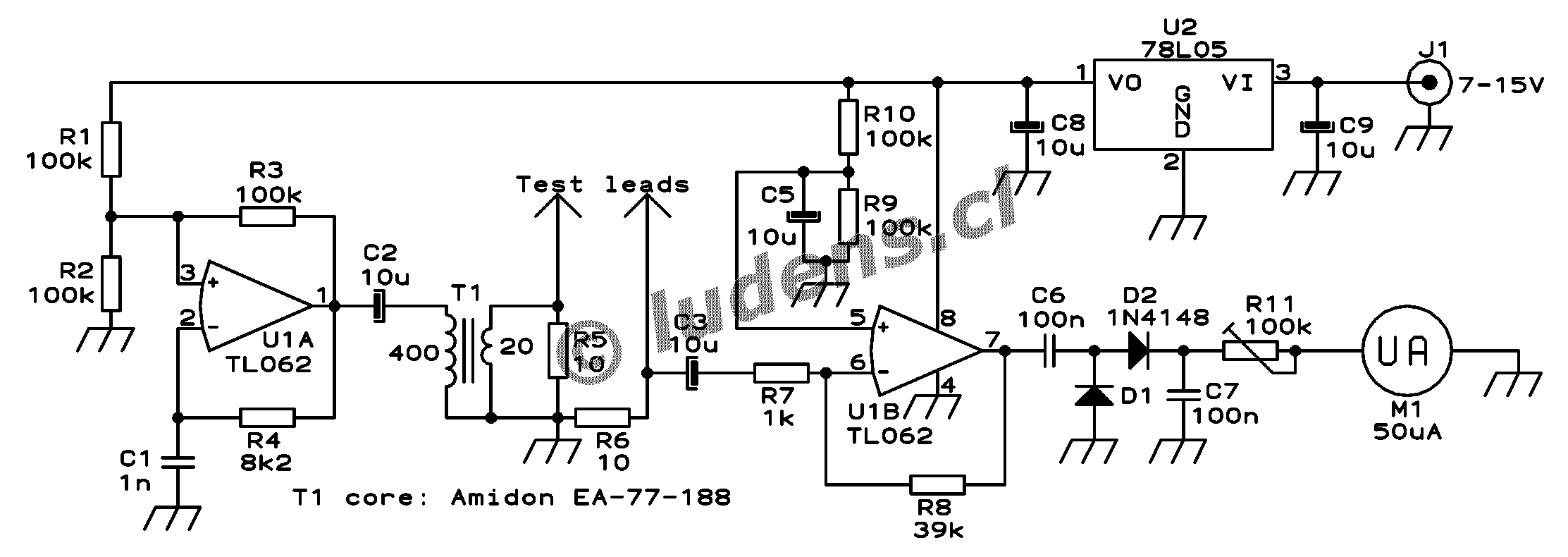
The design presented here works by applying a 50kHz, 200mV square wave to the capacitor under test, in series with a 10 Ohm resistor. The AC voltage appearing across that resistor is measured and displayed on a meter. So the whole thing is nothing else than a simple ohmmeter that uses ultrasonic AC for measurement instead of the usual DC used by every common ohmmeter. Since the Ac voltage used is so low, it does not make semiconductor junctions enter conduction, which further helps to make this meter suitable for checking capacitors mounted in a circuit.

Here is the schematic, which you can click on to get a larger version for printing.
One section of a dual low power operational amplifier is used as a square wave oscillator. A small ferrite core transformer is used to step down the voltage and provide the necessary low impedance output. A 10 Ohm resistor loads the output to absorb inductive spikes from the transformer, which could cause a false reading for low value capacitors. The other section of the op amp amplifies the signal that gets through the capacitor being tested, and its output is rectified and applied to a 50µA galvanometer through a calibration potentiometer. A small 5 Volt regulator maintains the supply constant while the instrument is being powered from anything between about 7 and 15 Volt. I power the meter from the 13.8V bus which I have in my workshop, but if you prefer, you can use a 9V battery instead, connected through a switch. The power consumption of this circuit is so low that a 9V battery should last at least 100 hours.

Building this ESR meter is simple and straightforward. I assembled the circuit on a scrap piece of project board, and used a small plastic box to install the board and the meter. The only part that could pose problems to inexperienced builders is the transformer. I made mine using an Amidon ferrite core, type EA-77-188, which is a tiny double-E core having a cross section of 22mm2, and external dimensions of about 19x16x5mm total. I used the nylon bobbin that Amidon delivers with it, wound a primary winding consisting of 400 turns of AWG #36 wire, and as secondary I wound 20 turns of AWG #26 wire. If you have a larger or smaller core, you can adjust the turn numbers in inverse proportion to the cross section area. The wire size isn't critical - the gauges I used are about 3 or 4 numbers thicker than necessary, while at the same time this bobbin has room for wire at least two numbers thicker than the ones I used. Thus, you can choose from about 6 different wire gauges for each winding, with negligible impact on the performance.

Considering that the transformer is so uncritical (because it runs at very low power), feel free to use any small ferrite core you have on hand, as long as it has no air gap. Dead PC power supplies and old monitors or TVs are great sources for such cores. Do not use an iron core, because it would probably have far too much loss at 50kHz.

The test leads are soldered into the circuit, and fixed in place using hot melt glue. Soldering them is much preferable over using any sort of connectors, because this meter easily detects resistance as low as 0.1 Ohm, and a connector can easily vary its resistance more than that! By the way, this set of test leads was bought as standard tester replacement leads, for very little money.

The meter is a reasonably good one rated at 50µA full scale, which I had on hand. If you find a cheap VU meter that works well, you can use it, of course. If you prefer to use a 100µA meter, change R11 to 50k. I used a trimpot for R11, but you might want to use a panel-mount potentiometer instead, which would allow fine adjusting the full-scale point if your meter happens to be unstable. If you use a cheap meter I would recommend this.


Calibration

Using the galvanometer's original scale, adjust its set screw for accurate zero position. With the circuit powered up, short the test leads together, and adjust R11 precisely for a full-scale reading. Now, take off the meter front cover, get a pencil and a few resistors in the range of 1 to 22 Ohm or so. Using the resistors as test objects, mark the corresponding deflections on the meter scale. It's your choice if you keep this crude hand-drawn scale indefinitely, or if you use it as a template to draw a definitive scale on the computer, print it and install it in the meter. I did the latter, and you can see the results on the top of this page.

Another version
After setting up this page, I
started getting lots of mail from other people who built their versions of the ESR meter. Curt Terwilliger, W6XJ, sent some high quality photos of his work. He found the box with the meter and banana jacks in his junk box, so needed just a little electronic tinkering to transform that thing into an ESR meter! The scale was redrawn, and the necessary guts installed behind.

He powered it from a 9V battery and even added a LED!


Curt used an existing transformer taken out of an old PC power supply. It has much lower impedance, and slightly lower turns ratio than my transformer, but works well enough.

Instead of the TL062, he used a TL084. That's a change I would not recommend, because the TL084 is not rated to work at the low voltage used here, so it's a matter of luck and tolerances that it works at all! Also, given the much higher saturation voltage of that opamp's output section, Curt had to modify the value of R8 to get a reasonable scaling on the meter. Before that, his instrument was driven into saturation, compressing the scale. But finally it worked for him, showing that builders can take quite a bit of artistic liberty and still get a useful result!

Curt used flat-style dead-bug construction on an unetched piece of PCB, obtaining a low profile circuit.


Using the meter

Take any capacitor with a value from about 1µF up, either loose or installed in a circuit, and connect the test leads to it. Polarity doesn't matter. Specially with high voltage caps, be sure the cap is discharged first. The meter will directly read the value of the equivalent series resistance of this capacitor. It should be pretty low, meaning that the meter should deflect to near full scale. Any large capacitor, say, over 100uF, should move the meter very close to full scale, often so close that you can't see the difference between the cap and a short circuit. If you read more than 1 Ohm or so, the capacitor has degraded, or was bad quality to start with. Small capacitors instead, say, 10µF and lower, could eventually have 1 or even 2 Ohm without being bad. Capacitors below 1uF will never reach very close to full scale, because these have enough reactance at 50kHz to be detected by the meter. As a reference, a good quality 1µF capacitor will read about 0.7 Ohm. while a good 220nF capacitor will read about 9 Ohm and a 100nF one will barely move the meter. So, you can consider this instrument as being reliable for any capacitor from 1µF up, and usable with increasing restrictions down to 100nF. Since almost all electrolytic capacitors have values from 1µF up, it's reasonable to advertise that this meter can be used for "essentially all" electrolytic capacitors, including tantalum caps.
What difference do these two tantalum caps have? If you look at them, you will notice that they look alike almost as much as two eggs laid by the same hen. The two come from the same factory, and should belong to the same manufacturing batch. The two came in a bag of 20 equal ones I bought at a local store. Measured on a capacitance meter, both have almost exactly the same capacitance, very close to their rated 47µF. Measured with a common ohmmeter, both have essentially infinite insulation resistance. But when measuring their ESR with my newly built meter, I was in for a surprise: The one at right, like the other 18 caps not shown in this picture, has an ESR of about 0.2 Ohm, which is quite normal for a tantalum cap of this size. But the one on the left is a bad apple (or egg?) and has a whopping 15 Ohm ESR!!! It has a manufacturing defect, impossible to tell without measuring the ESR. If I had placed this capacitor in a circuit that exposes it to significant ripple current, it would have exploded, which is a trick tantalum caps just love to perform. Worse than that, if I had used it to filter a signal, it simply wouldn't have worked well, and I would have never suspected why my circuit didn't perform as calculated! After this surprise, I must advice you to test every component before putting it into a circuit, and never assume that a part that comes fresh from the factory is actually a good part!


The first true troubleshooting use for my new ESR meter was in rejuvenating my dear oscilloscope. That one is a 30 year old Tektronix, which I bought in bad condition 20 years ago and fixed. For those 20 years I hadn't done much to it, and over the years several minor functions had failed, but the biggest duduk kasus was that the trace had degraded to a fuzzy broad strip, its intensity modulated by hum and by the signal being measured! This really smelled like degrading electrolytic capacitors, no wonder after 30 years.

With my ESR meter I quickly found five electrolytic capacitors which had degraded a lot. Interestingly, four of them were of the same merk and can size, even if of two different values - probably there was a sealing problem! Of these capacitors, one had 4 Ohm ESR, one had 6 Ohm, one 7 Ohm, and the other two had such high ESR that the meter wouldn't even deflect! The other electrolytic caps in the oscilloscope were all still healthy, with ESR values well below one Ohm for most, and close to one Ohm for a few low capacitance, high voltage ones. I replaced the bad ones, and this gave me back a well defined and stable trace! Also one of the dead functions revived. The other dead functions were due to two open resistors, one value-shifted resistor, and two open transistors, which I found by conventional troubleshooting. After fixing all that, and spending two days completely realigning the instrument, it's again as good as new! But that's a matter for another web page...

Selasa, 22 Januari 2019

Inilah Cara Mendownload Aplikasi Android Lewat Pc / Laptop

Cara Mendownload Aplikasi Android Lewat PC / Laptop - Setelah sebelumnya saya menciptakan posting ihwal cara download aplikasi pada gadget Android, di posting Hand Held (HH) kita. Fitur ini sering saya gunakan alasannya ialah saya merasa lebih leluasa dalam menentukan aplikasi melalui laptop. Selain itu, pengguna juga akan lebih gampang menentukan dan mendownload aplikasi jikalau mempunyai lebih dari satu device (tidak perlu membuka google play pada masing - masing device). Nah untuk cara mudahnya, yuk kita pribadi saja ke TKP :D


Sebelum mulai mencari dan mendownload aplikasi, hal pertama yang wajib anda lakukan ialah sign in ke akun google di PC / laptop anda, kemudian sign in akun google (dengan akun yang sama) pada masing - masing device yang anda miliki. Akun google sangat penting terutama jikalau anda ingin menikmati seluruh fitur yang ada pada device Android termasuk untuk urusan download menyerupai ini.


tips menentukan aplikasi Android. Jika anda sudah yakin dengan aplikasi tersebut, silahkan klik install (pada panah berwarna hijau). Anda juga sanggup melihat aplikasi apa saja yang terinstall dan pernah di install pada device anda pada tab My Android Apps (ditunjukkan panah berwarna putih)
Cara download file APK aplikasi Android ke PC atau laptop. Semoga bermanfaat :D

Minggu, 20 Januari 2019

Rabu, 16 Januari 2019

Inilah Data Pin Out Ic Ixd065wjzz/ Ixd062 :


pin 1. TV/YUV
pin 2. MP-SW
pin 3. TEST
pin 4. P-CONT
pin 5. KEY2/SERV
pin 6. COMP DET
pin 7. AFT
pin 8. EW-OUT
pin 9. VRAMP OUT
pin 10. VRAMP OUT
pin 11. AFC FIL
pin 12. DEF VCC 5V
pin 13. H-OUT
pin 14. FBP-IN
pin 15. DEF GND
pin 16. V.RAMP AGC FIL
pin 17. MID1 RF
pin 18. MID1 RS
pin 19. Y-IN
pin 20. CB-IN
pin 21. CR-IN
pin 22. MID2 RF
pin 23. MID2 RS
pin 24. SECAM PLL FIL
pin 25. C-APC
pin 26. MID3 RF
pin 27. MID3 RS
pin 28. XTALL
pin 29. CHROMA GND
pin 30. VIDEO AV OUT
pin 31. BASS RF
pin 32. BASS RS
pin 33. AV1- IN VIDEO
pin 34. SECAM BELL
pin 35. CHROMA VCC 5V
pin 36. TRE L
pin 37. TRE R
pin 38. BASS LF
pin 39. BASS LS
pin 40. AV-OUT L
pin 41. AV-OUT R
pin 42. AVL FILTER
pin 43. AV1-IN L
pin 44. AV1-IN R
pin 45. VIF GND
pin 46.VIF APC FIL
pin 47. RF AGC TUNER
pin 48. VIF IN 2
pin 49. VIF IN 1
pin 50. VIF AGC FIL
pin 51. TV-IN L
pin 52. TV-IN R
pin 53. VIF VCC 5V
pin 54. SIF MIXFB
pin 55. MID1LF
pin 56. MID1LS
pin 57. AU BYPASS
pin 58. MID2 LF
pin 59. MID2 LS
pin 60. AV2-IN R
pin 61. AV2-IN L
pin 62. MID3 LF
pin 63. MID3 LS
pin 64. AU DIRECT OUT
pin 65. SP-OUT R
pin 66. SP-OUT L
pin 67. ACL/ABCL/ABL IN
pin 68. AV2-IN VIDEO
pin 69. HI VCC 8V
pin 70. R-OUT
pin 71. G-OUT
pin 72. B-OUT
pin 73. VREG VCC 5V
pin 74. MCU RESET
pin 75. MP-DET
pin 76. SP-MUTT
pin 77. SAW-SW
pin 78. HLF
pin 79. V.HOLD
pin 80. CV IN
pin 81. PROTECT UTAMA
pin 82. AC-DETECTOR
pin 83. VERTIKAL PROTECT
pin 84. CNVSS/GND
pin 85. TEST1/GND
pin 86. TEST2/GND
pin 87. VSS/GND
pin 88. FIL
pin 89. VDD 5V
pin 90. CNVSS/GND
pin 91. KEY1/EXT
pin 92. RC-IN/I.R IN
pin 93. STDBY-LED
pin 94. PWR-LED
pin 95. SCL
pin 96. AV MUTE
pin 97. SDA
pin 98. EXT OUT
pin 99. YUV
pin 100. N.C